Homelab Rebuild Focusing on IaC, GitOps, and Automation
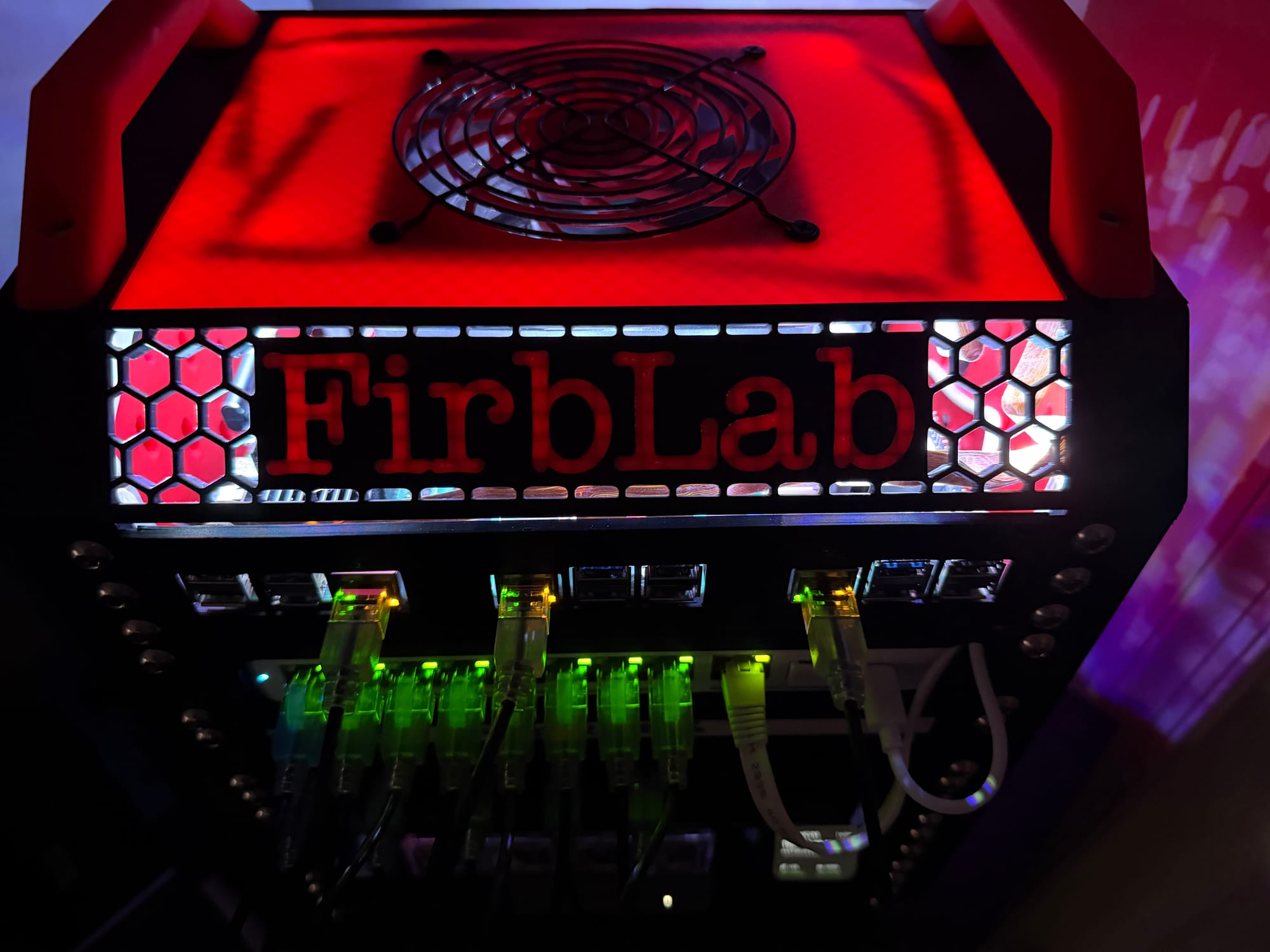
I'm an infrastructure engineer who's been working on my homelab over the last few years and learning as much as possible. FirbLab is my attempt to build a homelab that I consider to be up to the standard of production environments. This is everything I've learned about doing infrastructure the right way, rebuilt from the ground up into a single monorepo that manages my entire homelab through code.
FirbLab by the numbers: 9 Terraform layers | 30+ Ansible playbooks | 25+ roles | 3-node Vault HA cluster | 6-node RKE2 K8s cluster | 20 ArgoCD-managed apps | 27+ self-hosted services | 6 VLANs | 27 firewall zone policies | CIS L1 hardened | 3-2-1 backup strategy | Zero manual configuration
1. What is FirbLab?
So what exactly is FirbLab? It's a production-grade homelab managed entirely through code. But what does that mean exactly, and more importantly, why?
Well I've built up my homelab over the years, adding pieces here-and-there and creating a gigantic mess of code on my local workstation to go along with the gigantic mess of wires connecting all these homelab machines together. Some projects were built using best practices like IaC, GitOps, CyberSecurity whereas others were built to get the application or service running reliably in my homelab.
This left me with a dozen or so repositories scattered across my workstation, all doing different things differently. This drove me absolutely insane knowing that things I had deployed previously weren't up to snuff. So I rebuilt EVERYTHING from the ground up and put all the code into a single monorepo that would track my entire homelab infrastructure--from port profiles, VLANs, applications, IP addresses, templates, and so much more. From the beginning, a core principle was for this to be completely portable, meaning that someone else could take this code and eventually get things working in their homelab environment with minimal changes.
2. Core Principles
Figuring out how to make this not only secure, but also portable while also following best practices was difficult. Cybersecurity was at the forefront of the design philosophy and core principles for this project. Security was non-negotiable, regardless of how difficult it might make some aspects of this project. Another core tenet of this project was that EVERYTHING must be codified– if it can't be replicated by running terraform apply, ansible-playbook, or packer build, it doesn't count. Learning GitOps has honestly been one of the more reassuring parts of this entire project. If you can get GitOps working correctly, it alleviates so much stress and headaches and allows for things to just work properly.
This meant absolutely no manual changes whatsoever, which is something I've struggled with quite a bit in my professional career. I cannot tell you how many times I've been told something works as expected in one environment just to have it not work in another environment, and it almost always boils down to some type of extra step or manual change that was needed to get it working that wasn't codified and wasn't conveyed to the next person. Well absolutely fucking not in my homelab. Everything must be tested and confirmed to work end-to-end with minimal manual configuration and setup.
3. The Hardware
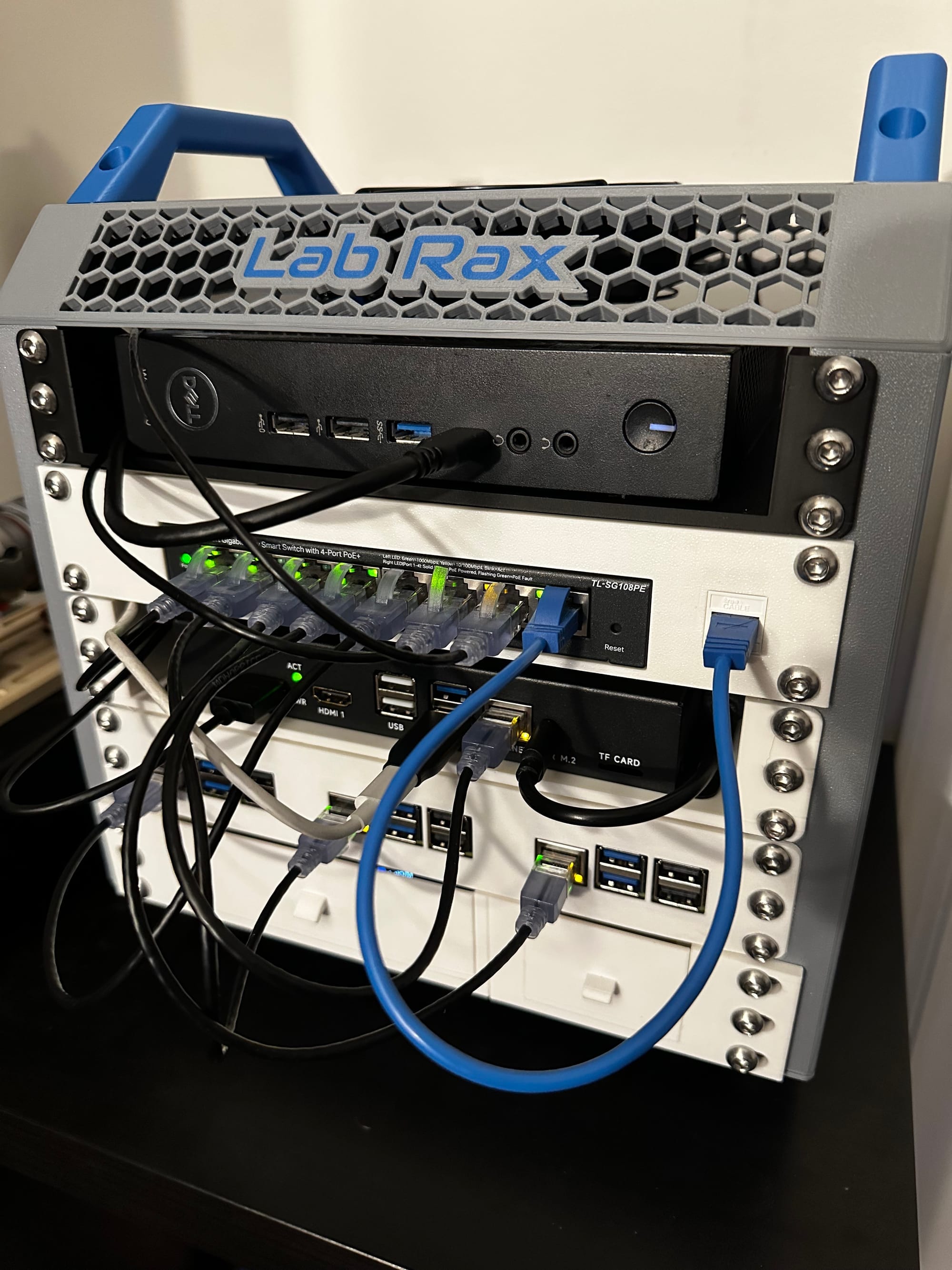
I've built up a bit of a homelab over the years. It started with my very first custom built gaming PC about a decade ago which I eventually retired. So I had a decent-ish PC just sitting in a corner collecting dust. Add in a few Raspberry Pis for different projects like retro game system, handheld cyberdeck, home assistant; a couple cheap, used dell PCs; and a Mac Mini M4 and you've got a pretty decent beginning to a homelab. The total hardware cost for the on-prem side of things is surprisingly low — most of this is retired consumer hardware and sub-$100 used machines. My public-facing infrastructure runs on a single Hetzner VPS that costs a fraction of what I was paying AWS for the same workloads. The entire homelab — on-prem compute, cloud VPS, S3 backups, domain, DNS — runs for less per month than most people pay for a single streaming subscription.
But those are just devices, the real magic is in how they're connected and what they're configured to do. One thing I neglected entirely when setting up my homelab initially was the networking. I just threw everything on the default VLAN and let er rip. That went... about as well as you would expect... Lots of networking troubles, lots of headaches getting things to work together, and lots of stress from running things in a not-so-secure manner.
4. Network Architecture
Segmenting my homelab into separate VLANs was a gamechanger for both security as well as orchestration. And keeping everything stored in code meant I had an easy to follow reference for all existing networking infrastructure.
- 6-VLAN segmentation — Default, Management, Services, DMZ, Storage, Security
- Zone-based firewall — 27 zone policies, all declared in Terraform
- Key isolation rules — DMZ can't reach Management/Storage, Storage is accept-only, Security VLAN is isolated
- Switch port profiles — 5 profiles (Proxmox Trunk, Management Access, Services Access, Storage Access, Scanner Trunk)
- Everything managed by Terraform
- Internal DNS
- WireGuard site-to-site tunnel
- Reverse proxy strategy
- Dual-layer firewall — UDM Pro zone policies + per-host UFW/iptables; a packet must pass both
5. Infrastructure as Code — Terraform
Terraform makes managing all of this a breeze. I have a layered terraform architecture, each with an independent state, each managing different aspects of my homelab infrastructure.
Layered architecture — 9 Terraform layers applied in order, each with independent state:
| Layer | Purpose |
|---|---|
| Layer 00 | Network (UniFi) |
| Layer 01 | Proxmox base (ISOs, cloud images, templates) |
| Layer 02 | Vault (infra + config, split layers) |
| Layer 03 | Core infra (GitLab + Runner) + GitLab config |
| Layer 04 | RKE2 Kubernetes cluster |
| Layer 05 | Standalone services (13+ VMs/LXCs) |
| Layer 06 | Hetzner + Cloudflare DNS + S3 buckets |
| Layer 07 | Authentik SSO configuration |
| Layer 08 | NetBox DCIM/IPAM configuration |
Terraform also keeps efficiency at the forefront with things like reusable modules: proxmox-vm, proxmox-lxc, proxmox-rke2-cluster, hetzner-server, cloudflare-dns, vault-cluster. These reusable modules keeps the codebase clean, efficient and prevent it from ballooning like the codebase before Firblab.
6. Secrets Management — HashiCorp Vault
If there's one thing I've been absolutely militant about in this project, it's secrets management. No hardcoded credentials. No .env files floating around on disk. No "I'll just export this API key real quick" nonsense. Every single secret in FirbLab lives in HashiCorp Vault, and every single tool that needs a credential pulls it from Vault at runtime. Full stop.
The Vault cluster itself is a 3-node Raft HA setup, and honestly the topology is one of the cooler parts of the project. One node runs natively on the Mac Mini (macOS), another is a Proxmox VM running Rocky Linux, and the third is an RPi5 running Ubuntu ARM64. Three different operating systems, three different hardware platforms, three different failure domains. Quorum requires 2 of 3 nodes, so the cluster tolerates a single node failure without breaking down.
The auto-unseal architecture was tough to figure out but it was absolutely worth it. There's a dedicated lightweight Vault instance running on the Mac Mini whose sole purpose is to serve as a Transit unseal key for the main cluster. When the power comes back after an outage, you manually unseal that one tiny Vault instance, and the entire 3-node production cluster auto-unseals itself. The unseal key for that lightweight instance is stored in three places: my password manager, a QR code in a physical safe, and age-encrypted on the RPi. Paranoid? Maybe. Who am I kidding, yeah it's paranoid, but I get to print out a little QR code and that's cool.
Secrets are organized into a clean taxonomy: infra/ for infrastructure device credentials like Proxmox and UniFi, compute/ for per-host secrets like SSH keys, services/ for application-level stuff like GitLab and Grafana, k8s/ for Kubernetes secrets synced by External Secrets Operator, and backup/ for backup encryption keys. There's also a PKI secrets engine running a root CA with a 10-year lifetime and an intermediate CA with a 1-year lifetime for internal TLS. Every internal service gets a proper certificate.
Access policies follow least privilege religiously. There are scoped policies for admin, terraform, gitlab-ci, k8s-external-secrets, backup, and cert-manager — each with access to only exactly what they need. Every Terraform layer reads its credentials from Vault, never from local files or environment variables. And audit logging is enabled on every Vault node, so every single request and response is HMAC-logged. If something goes sideways, I have a full audit trail.
7. Configuration Management — Ansible
Ansible is where the rubber meets the road. I've got over 30 playbooks covering everything from proxmox-bootstrap.yml to ai-gpu-deploy.yml, and over 25 roles handling things like common setup, CIS hardening, Docker, Vault, Ghost, NetBox, Scanopy, PatchMon agents, and the archive appliance among others.
The real beauty of the configuration management story is the pipeline: Packer bakes the immutable baseline (roughly 30% of the hardening), Terraform provisions the infrastructure, and Ansible enforces the runtime state (the remaining 70%). Packer handles things that should never change — SSH hardening, UFW defaults, fail2ban, kernel parameters, disabled filesystems. Ansible handles everything that's environment-specific or needs to be updated over time — AIDE monitoring, AppArmor profiles, auditd rules, file permissions, per-host firewall rules, and service-specific enrollment tasks like registering PatchMon agents for fleet-wide patch monitoring, enrolling Scanopy targets for automated network discovery and NetBox sync, and configuring Prometheus exporters for metrics collection across the infrastructure.
There's also OS-family dispatch baked into the roles, so the same playbook works across Ubuntu, Rocky Linux, and macOS. VMs get the full common + hardening role treatment. LXC containers only get common because they share the host kernel — trying to configure sysctl, auditd, or AppArmor inside an unprivileged container is meaningless and will just throw errors.
All secrets in Ansible are fetched from Vault at runtime. Nothing is hardcoded in group_vars or host_vars. Every host gets its own ED25519 SSH key, and services on VLAN 20 and VLAN 30 are accessed through jump hosts. It's a clean, repeatable, auditable setup.
8. Kubernetes — RKE2 + ArgoCD GitOps
I went with RKE2 for the Kubernetes distribution after comparing quite a few options. I've used Talos, K3s, and Rancher at home and IKS and EKS at work. The big selling point for me was that RKE2 is DISA STIG-certified with CIS Kubernetes Benchmark compliance out of the box. When security is a core principle, starting with a distribution that's already hardened saves an incredible amount of work.
The cluster runs 3 server nodes and 3 agent nodes, all on firblab-01 which has 24 cores, 48 GB of RAM, and about 600 GB of Longhorn storage. It's not a massive cluster by any means, but it handles everything I need it to without breaking a sweat.
ArgoCD manages the platform services using the app-of-apps pattern, which has been an absolute game changer. There are 20 applications deployed across 3 sync waves:
| Wave | Purpose | Applications |
|---|---|---|
| Wave 0 | Foundation | Traefik, MetalLB, cert-manager, ESO, Gatekeeper, Longhorn, Prometheus, Loki, Trivy, GitLab Agent |
| Wave 1 | Configuration | MetalLB config, cert-manager config, ESO config, Traefik config, ArgoCD config, Longhorn config, Gatekeeper policies |
| Wave 2 | Workloads | Mealie, SonarQube, Headlamp |
The wave system ensures things come up in the right order, because deploying a workload that depends on cert-manager before cert-manager is ready is a recipe for a bad time.
External Secrets Operator syncs secrets from Vault into Kubernetes using a ClusterSecretStore, so applications just reference normal K8s Secrets and ESO handles keeping them in sync with Vault. MetalLB is configured in L2 mode, handing out LoadBalancer IPs on the Services VLAN from 192.168.20.220 through 250. Longhorn provides persistent storage with 6-hourly local snapshots. Pod Security Admission is configured per namespace with restricted, baseline, or privileged profiles depending on the workload. Gatekeeper with OPA enforces additional policy via constraint templates. And Trivy Operator handles vulnerability scanning across the cluster.
It's a lot of moving pieces, but once ArgoCD is managing it all through GitOps, changes are just merge requests. Push to main, ArgoCD syncs, done. It's beautiful.
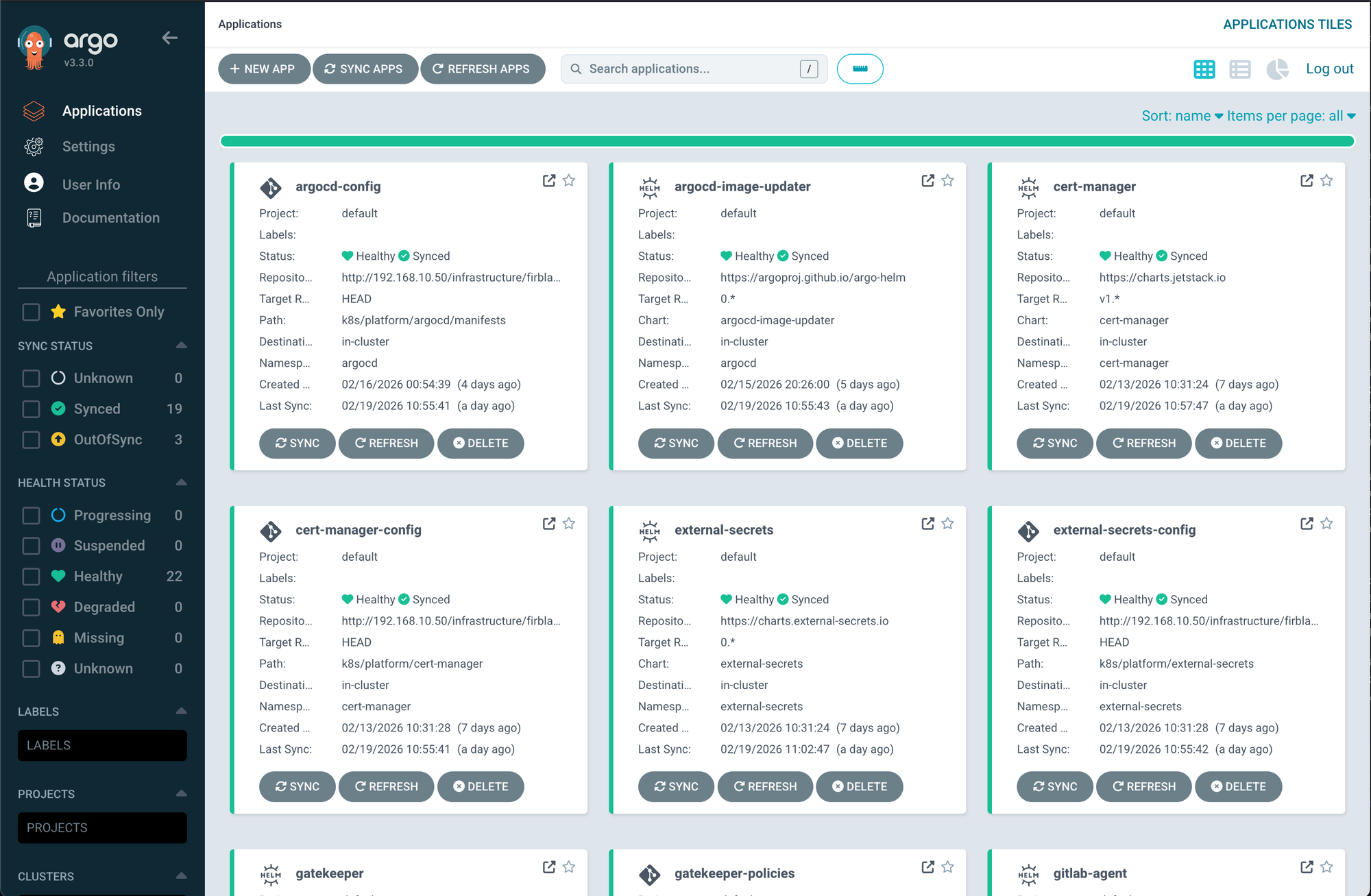
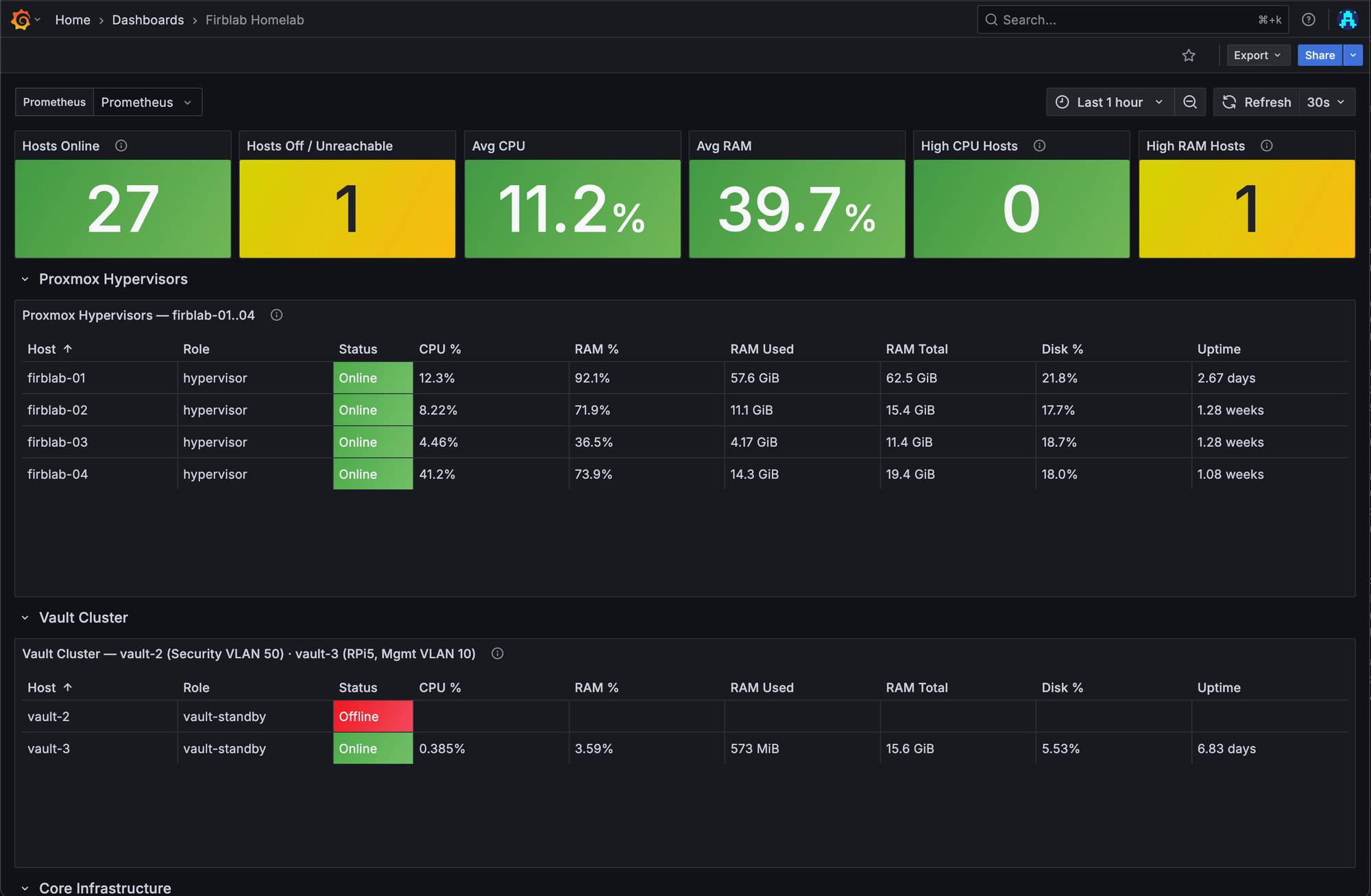
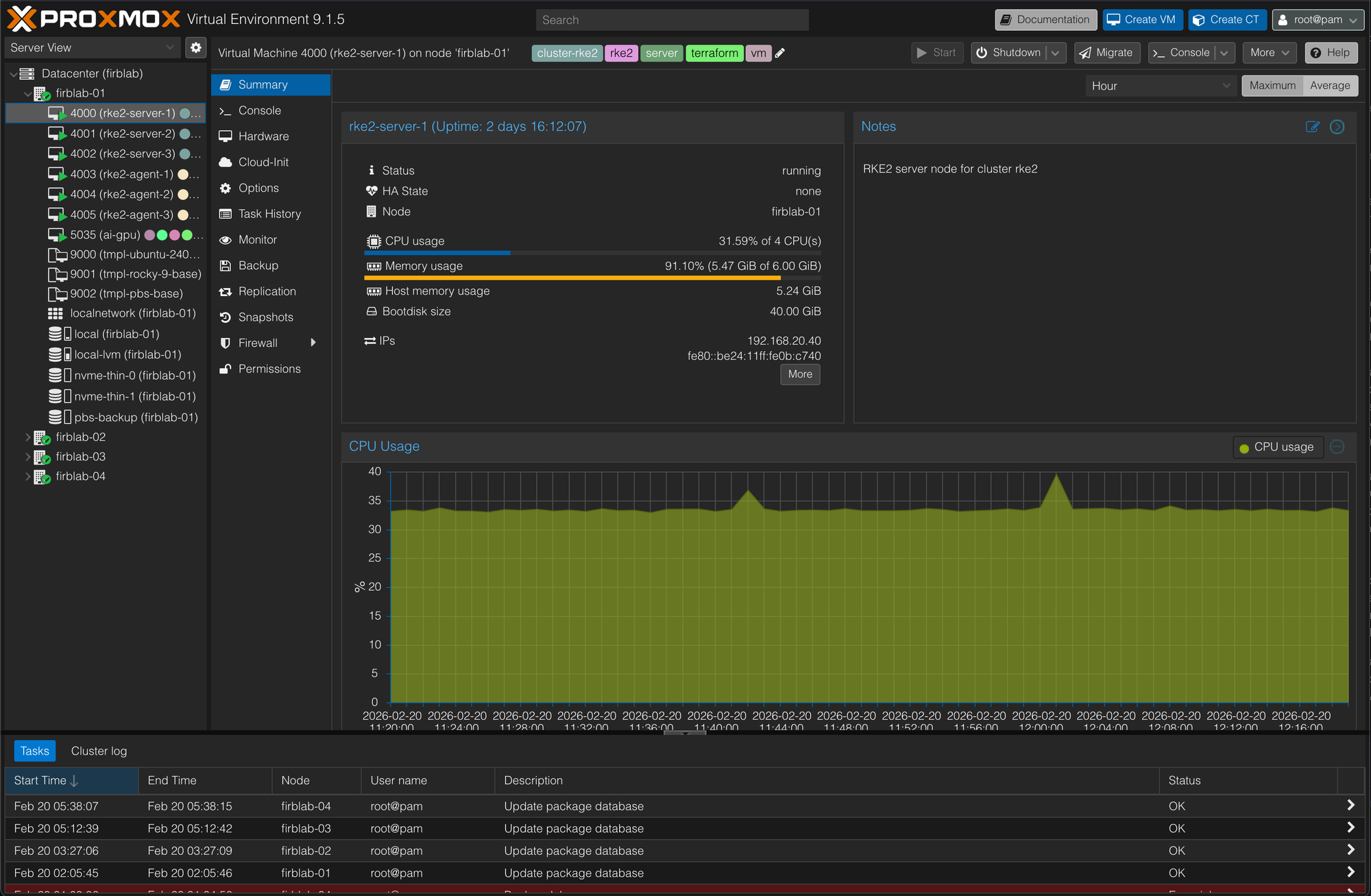
ArgoCD dashboard, ArgoCD applications, Kubernetes workloads screenshots
9. Security Architecture
I mentioned at the top that cybersecurity was non-negotiable, and I wasn't kidding. Every single host in the homelab gets CIS Level 1 hardening using DevSec OS and SSH hardening benchmarks, with additional CIS Ubuntu 24.04 benchmark controls layered on top. Every host runs fail2ban. Internet-facing hosts get CrowdSec on top of that. Every host runs auditd with CIS-compliant audit rules. Every host runs AIDE for file integrity monitoring. Ubuntu hosts get AppArmor, Rocky hosts get SELinux. Every host has unattended security updates enabled. This is the baseline. There are no exceptions.
The Mac Mini gets its own hardening treatment — FileVault disk encryption, pf firewall, limited SSH access, and automatic screen lock. Different OS, same security posture.
TLS is everywhere. Public-facing services use Let's Encrypt certificates. Internal services use certificates issued by the Vault PKI engine. Kubernetes services use cert-manager. The bootstrap certificate chicken-and-egg problem — where Vault needs TLS to start but also issues the TLS certificates — is solved by having the initial Vault TLS certs generated by an Ansible playbook using the Vault PKI engine during initial setup, before the rest of the infrastructure comes online.
MFA is enforced on everything that supports it: GitLab TOTP, Vault TOTP, Proxmox TOTP, WireGuard PSK. VLAN isolation is validated by running port scans from each VLAN to confirm that only expected ports are reachable — trust but verify, or honestly just verify. There are documented incident response procedures for a compromised secret, a Vault seal event, and a node compromise. And there's a security maintenance schedule with tasks at daily, weekly, monthly, quarterly, and annual cadences to keep everything tight.
Is it overkill for a homelab? For sure. But it was fun to setup.
10. SSO & Identity — Authentik
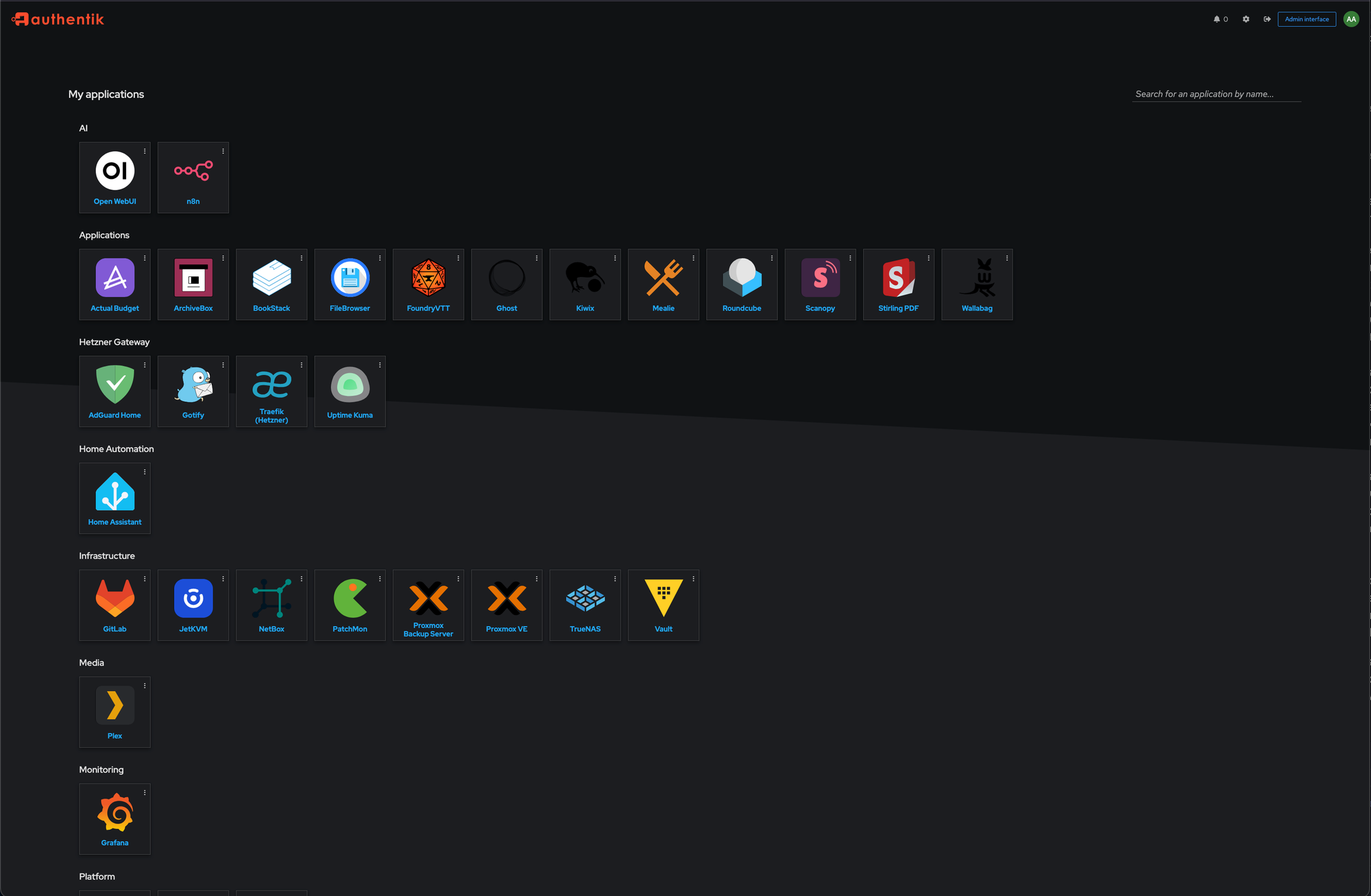
I got really tired of managing separate credentials for every single service, so Authentik became the central identity provider for the entire homelab. It's managing 12 OIDC providers, 5 ForwardAuth proxies, and 11 bookmark applications — all managed by Terraform in Layer 07.
Apps that support OIDC natively — Vaultwarden, Open WebUI, Grafana, ArgoCD, Headlamp, GitLab — get proper OIDC integration. Legacy apps that don't support OIDC — Ghost, Roundcube, FoundryVTT, Actual Budget, Longhorn, n8n — get ForwardAuth through the Traefik reverse proxy so they're still behind authentication. The embedded outpost means I don't need to deploy a separate proxy container, which keeps things clean.
The authentication dashboard is probably my favorite quality-of-life feature. It's a single page with bookmarks for every service in the homelab — PBS, Plex, Home Assistant, TrueNAS, JetKVM, all the Hetzner services — all behind Authentik. One login, access to everything. It's the kind of thing that seems small but makes the day-to-day experience of actually using the homelab so much better.
11. Services Ecosystem
So what's actually running on all this infrastructure? Quite a lot actually. And every service was chosen not just because it's useful day-to-day, but because deploying and maintaining it exercises a real infrastructure skill.
For the everyday stuff: Ghost powers this blog, FoundryVTT runs tabletop RPG campaigns, Roundcube handles webmail through Migadu, Mealie stores all our recipes, and Actual Budget tracks our finances. These aren't just apps running in Docker — each one is Terraform-provisioned, Ansible-configured, Vault-integrated, TLS-terminated, SSO-federated, and backed up on schedule. The patterns I use to deploy a recipe manager are the same patterns I'd use to deploy a production microservice. Shoutout to Mealie though, it really is my favorite application I've used in quite some time.
For development: GitLab CE handles source control and CI/CD, SonarQube handles code quality analysis. Vaultwarden replaced 1Password for password management. Running my own GitLab instance means I understand the full CI/CD pipeline from runner registration to artifact storage to deploy tokens — not just the developer-facing parts.
On the infrastructure management side: NetBox serves as the DCIM and IPAM source of truth — the same tool used by data center operators to track assets, IP allocations, and cable management. PatchMon monitors patch status across 27 agents with a 60-minute reporting interval, giving me the kind of fleet-wide vulnerability visibility that most organizations struggle to achieve. Open WebUI paired with Ollama gives me a local AI/LLM setup with AMD GPU passthrough — no data leaving my network, and a practical exercise in GPU infrastructure, PCI passthrough, and resource scheduling. n8n handles workflow automation.
One of the more outlandish projects is the archive appliance — a single machine running Kiwix, ArchiveBox, BookStack, Stirling PDF, Wallabag, and FileBrowser. It's sitting on 417 GB of offline knowledge. Wikipedia, Stack Overflow, documentation archives — all available even if my internet goes down. Call it paranoid, call it prepared, either way it's an exercise in disaster preparedness and offline-first infrastructure design.
Scanopy is a custom multi-VLAN L2 network scanner that uses 802.1Q sub-interfaces to scan across all VLANs and automatically sync discovered devices to NetBox — automated asset discovery and CMDB discipline. NUT handles UPS monitoring and coordinated shutdown across all the hosts when power gets dicey.
Out on Hetzner, I've got Traefik as the public reverse proxy, WireGuard for the site-to-site tunnel, AdGuard Home for DNS filtering, CrowdSec for threat detection, Gotify for push notifications, Uptime Kuma for monitoring, and Watchtower for keeping containers updated.
Service placement follows a clear philosophy:
- LXC containers — lightweight Docker apps that don't need kernel features
- VMs — anything that needs its own kernel or hardware access
- Kubernetes — stateless workloads that benefit from auto-healing and scaling
- Bare metal — hardware-dependent tasks like GPU passthrough and network scanning
12. CI/CD Pipeline
The CI/CD pipeline was one of those things that I kept putting off because it felt like yak-shaving, but once it was in place it became one of the most valuable parts of the entire project. GitLab CI drives everything through a set of shared CI templates — terraform-ci, ansible-ci, kubernetes-ci, d2-ci, rover-ci, and renovate-ci. Each template handles the boilerplate so individual pipelines stay clean and focused.
Path-based triggers ensure that each Terraform layer's pipeline only fires when changes are made to its directory. No more waiting for every pipeline to run when you change a single line in one layer. The CI runner authenticates to Vault using AppRole and gets scoped tokens per pipeline, so even if the runner were compromised, the blast radius is limited to whatever that specific pipeline has access to.
Some of the cooler CI features: Rover generates interactive Terraform plan visualizations that get stored as CI artifacts, so you can visually inspect what a plan is going to change before you approve it. D2 renders architecture diagrams as code directly in the pipeline, so the diagrams in the docs are always generated from the actual source of truth rather than some stale Lucidchart that nobody remembers to update.
Renovate Bot handles automated dependency updates for Helm charts, Terraform providers, Ansible collections, and CI base images. It opens merge requests automatically, I review and merge, and the pipeline takes care of the rest. ArgoCD Image Updater runs in Git write-back mode, so when a new container image is available, it commits the update to Git, ArgoCD picks it up, and the cluster converges. It's GitOps all the way down.

13. Monitoring & Observability
You can't manage what you can't see. Prometheus, Grafana, and Loki run inside the RKE2 cluster handling metrics collection, dashboards, and log aggregation respectively. This covers everything running in Kubernetes as well as some external targets.
Uptime Kuma runs on Hetzner and handles synthetic monitoring — it checks public endpoints from outside the network so I know if something is actually reachable from the internet, not just "up" from the perspective of a host sitting on the same VLAN. Gotify, also on Hetzner, serves as the push notification hub for all alerts. The alert flow goes: Prometheus fires to Alertmanager which pushes to Gotify, Uptime Kuma fires directly to Gotify, and ArgoCD sync failures fire to Gotify. One notification channel, everything lands in the same place.
PatchMon is a custom patch monitoring tool with a 27-agent fleet that reports every 60 minutes. It tells me which hosts have pending security updates, which are behind on kernel patches, and which need attention. Scanopy handles network discovery and automatically syncs findings to NetBox on a daily cron schedule. Between the two of them, I've got a pretty solid picture of what's running, what's reachable, and what needs patching.
14. Backup & Disaster Recovery
This is the section that nobody wants to think about but everyone needs. The backup strategy follows the 3-2-1 rule: at least 3 copies, on at least 2 different types of media, with at least 1 off-site. Everything that hits off-site storage is age-encrypted before upload.
The backup matrix covers the critical services:
| Service | Frequency | Method |
|---|---|---|
| Vault | Every 6 hours | Raft snapshot + age encryption |
| GitLab | Daily | Incremental backup |
| Longhorn | Every 6 hours | Local snapshots |
| Proxmox VMs | Daily | PBS with deduplication |
| Docker volumes | Daily | Volume export |
| Terraform state | Per-apply | State snapshot |
Proxmox Backup Server handles the centralized dedup backups with a ZFS mirror providing roughly 14.6 TB of storage capacity, registered across all 4 PVE nodes.
S3 lifecycle policies on the Hetzner backup buckets enforce 30-day server-side expiration, so old backups get cleaned up automatically without me having to think about it. RPO and RTO targets are defined per service — Vault has a 6-hour RPO because it's the most critical piece, while most services sit at 24-hour targets.
I've mapped out a service dependency tree with 6 tiers from physical infrastructure all the way up to application services, so when disaster recovery planning comes up I know exactly what needs to come back online first and in what order. The power topology splits between the UPS-protected closet rack and the wall-powered minilab, with NUT handling coordinated shutdown sequences when the UPS starts running low.
There are documented disaster scenarios for brief outages, extended outages, single node failures, and Vault cluster failures — each with step-by-step recovery procedures. And restore testing happens on a schedule: quarterly for Vault, semi-annually for everything else. Because a backup you've never tested restoring is just a file that makes you feel good about yourself.
15. Documentation as Code
Honestly, documentation might be the least glamorous part of this entire project, but it's one of the most important — especially when the whole point is portability. If someone else is going to fork this and run it on their own hardware, the docs need to be just as solid as the code.
CURRENT-STATE.md is the authoritative inventory of the entire homelab, and it gets updated on every infrastructure change. No exceptions. Beyond that, there's a whole ecosystem of docs:
ARCHITECTURE.md— Design philosophyNETWORK.md— Full topologySECURITY.md— Security postureDEPLOYMENT.md— Bootstrap sequenceDISASTER-RECOVERY.md— DR proceduresVAULT-OPERATIONS.md— Vault operationsMACHINE-ONBOARDING.md— Step-by-step guide for adding new machinesRUNBOOKS.md— Common operational procedures
Architecture diagrams are written in D2 and rendered automatically in CI, so they're always current. And NetBox serves as the DCIM/IPAM source of truth, managed by Terraform in Layer 08 with Scanopy automatically syncing discovered devices on a daily schedule. The docs describe the intent, the code implements it, and NetBox tracks what actually exists. Between the three, there's no ambiguity about the state of the homelab.
16. Lessons Learned / Battle Scars
No project like this comes together without a few scars, and I'd rather be honest about the things that bit me than pretend it was all smooth sailing.
The .local domain debacle was probably the most infuriating. I initially used .local as my internal domain and couldn't figure out why DNS lookups on macOS were taking 5 seconds. Turns out macOS treats .local as an mDNS domain and goes through a completely different resolution path before falling back to normal DNS. Switching to a proper internal domain fixed it instantly, but not before I lost hours of my life to that one.
Longhorn pre-upgrade hook deadlock — Longhorn had a pre-upgrade hook that deadlocked and left 40+ pods stuck in a terminating state. That was a fun afternoon.
The ESO CRD annotation limit — the External Secrets Operator hit a 256KB annotation limit on CRDs that caused silent sync failures — the fix was adding ServerSideApply=true, but diagnosing the root cause took way longer than it should have.
The fail2ban + ssh-agent footgun was a classic. When you have multiple SSH keys loaded in your agent, the SSH client tries each one sequentially. If the target host only accepts one specific key, all those failed attempts count as authentication failures, and fail2ban bans your own IP. The fix is using -i <key> -o IdentitiesOnly=yes, but you have to learn that lesson the hard way at least once.
Switch port profile changes can brick a node. Applying the wrong VLAN profile to a Proxmox node's management port means that node drops off the network entirely, and the only recovery path is physical console access. That's why the network IaC rules are so paranoid about incremental cutover.
The Packer boot order gotcha and PVE 9.x guest agent permission change were both cases where documentation for the tool I was using was either outdated or incomplete. boot = "c" uses a legacy BIOS format that breaks ISO boot in newer Proxmox versions. And PVE 9.x quietly removed the VM.Monitor privilege and replaced it with VM.GuestAgent.Audit — so Packer's guest agent queries just silently failed until I tracked down the permission change.
Every single one of these is now documented in the codebase with comments explaining the gotcha and the fix. Future me (or anyone else running this) shouldn't have to re-learn these lessons.
17. What's Next
FirbLab is never really "done" — that's kind of the point. There's always something to improve, something to harden, something to automate better.
- Wazuh SIEM/EDR — The next big deployment on the roadmap. The main blocker right now is that it needs a host with more RAM than I currently have available, so that's a hardware problem more than a software one.
- Dedicated Hetzner honeypot server — Gather threat intelligence from the public internet and feed it back into CrowdSec.
- NetBox as Ansible dynamic inventory — So the
hosts.ymlfile becomes generated rather than manually maintained. - Remote Terraform state backend — Move off local state files to a proper remote backend.
- Immutable backups — S3 Object Lock or WORM storage so that even if everything else is compromised, the backups can't be tampered with.
- Open-source release — The full FirbLab monorepo will be published publicly so others can fork it and adapt it to their own homelab environments.
The work never ends, but that's what makes it fun. If you're building something similar — or think some of these patterns are overkill for a homelab — I'd love to hear about it.